
 In 2017, when I last wrote a My Gear chapter about a new computer, I started with some bragging about the longevity of the machine being replaced. It was still functioning after more than seven years of use. This chapter begins in a similar fashion, since the laptop this computer replaces went into service near the end of 2016, meaning it was in use for more than nine years, and is still running just fine. Physically, it is in much better shape than its predecessor. The ThinkPad T400, replaced in 2016, had required some parts to be replaced to keep it going, and by the end its hard drive was literally held in place with duct tape. Purchasing its replacement was due to a justified fear of a full meltdown at a most critical time.
I’ve had no such fears with the ThinkPad 13 now being replaced. The only hardware failure involved the external charger. The only hardware limit that ever caused me worry was disk space, which was at risk of overflowing with photos on longer trips. There was an issue with the Wi-Fi that briefly caused some concern. During the 13’s long life, Wi-Fi technology kept on advancing so that it became incompatible with the newest generation of routers. After some head-scratching, I eventually figured it out, and in the few motels I stayed at with leading-edge gear, I tethered the laptop to my much newer phone, which connected to the Wi-Fi with no problem.
The 13’s issue was software. Specifically, Operating System software. It could have been avoided or at least delayed if I’d had more faith in 2016. At a low point in my time with the T400, panic prompted me to purchase a computer running Microsoft Vista. I hated it. Windows 10 was the default OS when I bought the ThinkPad 13, but Windows 7 was still available. That’s what I chose. Support for Windows 7 ended on January 14, 2020. Since then, new versions of some third-party software I use have stopped guaranteeing compatibility with Windows 7, and some refuse to even try. I was getting by, but needed to ignore more and more warning messages.
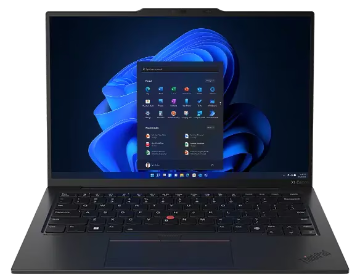
Enter the new machine. It’s a Lenovo ThinkPad X1 Carbon Gen 12 Intel (14ʺ) with Intel® Core™ Ultra 7 155U Processor, Windows 11 Pro 64, 32 GB RAM, and a 512 GB SSD. I bought it on sale for $1,000 off its $2,199 list price. I also bought Microsoft Office Home 2024 preloaded. I moved away from MS Office with the ThinkPad 13. I had retired and, without the need to maintain compatibility with work software, could not justify the cost. The one-time purchase price of $135 for Office 2024 seemed something of a bargain. A recent Gmail announcement was on my mind and nudged me toward the MS Office purchase. When I moved from MS Office and Outlook in 2016, I fully embraced Gmail for all of my email accounts. Google recently announced that new Gmail accounts will not support external POP3 accounts and that support will be dropped from existing accounts in January. I’ve yet to make the change, but consider having Outlook available a real safeguard.
Actually, I treated the computer itself as a safeguard for some time. I bought it in November, 2025, but did not put it into service until May, 2026. The ThinkPad 13 was meeting my needs, and I was reluctant to undertake the big chore — and risk — of switching. I think it was the thought of my investment sitting idle and depreciating that finally got me to act. When I did, I bought another piece of software to assist. I’d seen ads from Zinstall for a product that claimed to do exactly what I wanted. I had an online chat with their support people and decided to give it a go. My extra-short review of the product is that it does what it says it will do. I connected my two computers to the internet, downloaded the software, followed some fairly simple instructions, and had all of the old stuff installed and working on the new machine about a day later. That included things like Quicken, which had been my biggest worry. For this guy with fading tech skills, I thought it was $129 well spent.
I also bought a new accessory for the new computer. I had no choice. At the last computer change, I lost a built-in CD drive. I had actually lost it earlier when it stopped working reliably, so I already owned an external USB drive that worked with the replacement laptop. This time, I lost a built-in SD card reader so had to buy an external USB adapter. It was about 10 bucks.
The X1 clearly has all the power and capacity I’m likely to need for the foreseeable future, and if its durability is in line with my previous Lenovos, there’s a good chance it will be around as long as I am. This could be the last computer I’ll ever buy.